class: center, middle # Functions and iteration .class-info[ **Week 12** AEM 2850 / 5850 : R for Business Analytics<br> Cornell Dyson<br> Fall 2025 Acknowledgements: <!-- [Andrew Heiss](https://datavizm20.classes.andrewheiss.com) --> [Claus Wilke](https://wilkelab.org/SDS375/) <!-- [Grant McDermott](https://github.com/uo-ec607/lectures) --> <!-- [Jenny Bryan](https://stat545.com/join-cheatsheet.html), --> <!-- [Allison Horst](https://github.com/allisonhorst/stats-illustrations) --> ] --- # Announcements **Group project due this Friday, November 14!** Office hours for the rest of this week: - Tuesday: Prof. Gerarden open office hours from 11:30-12:30 in Warren 464 - Thursday: Prof. Gerarden by appointment at [aem2850.youcanbook.me](https://aem2850.youcanbook.me) - Friday: TA office hours from 1:00-2:00 in Warren B05 We will have a homework this week (due Monday 11/17) - Will work through part of the homework on Thursday in class - We will have regular TA office hours on Monday Questions before we get started? --- # Plan for this week .pull-left[ ### Tuesday - [Intro to functions and iteration](#functions-intro) - [example-12](#example) ] .pull-right[ ### Thursday - [Conditional execution](#conditional-execution) - [Functions with multiple arguments](#multiple-arguments) - [homework-12](#homework-2) ] --- class: inverse, center, middle name: functions-intro # Intro to functions and iteration --- # We often run similar code multiple times .left-code[ ``` r sp500_prices |> filter(symbol == "AAPL") |> ggplot(aes(x = date, y = adjusted)) + geom_line() + labs(x = NULL, y = "Share price ($)", title = "Symbol: AAPL") + scale_x_date(date_breaks = "1 year", date_labels = "%Y") + scale_y_continuous(limits = c(0, NA)) + theme_bw() ``` What needs to change if we want to look at AMZN share prices instead? ] .right-plot[ 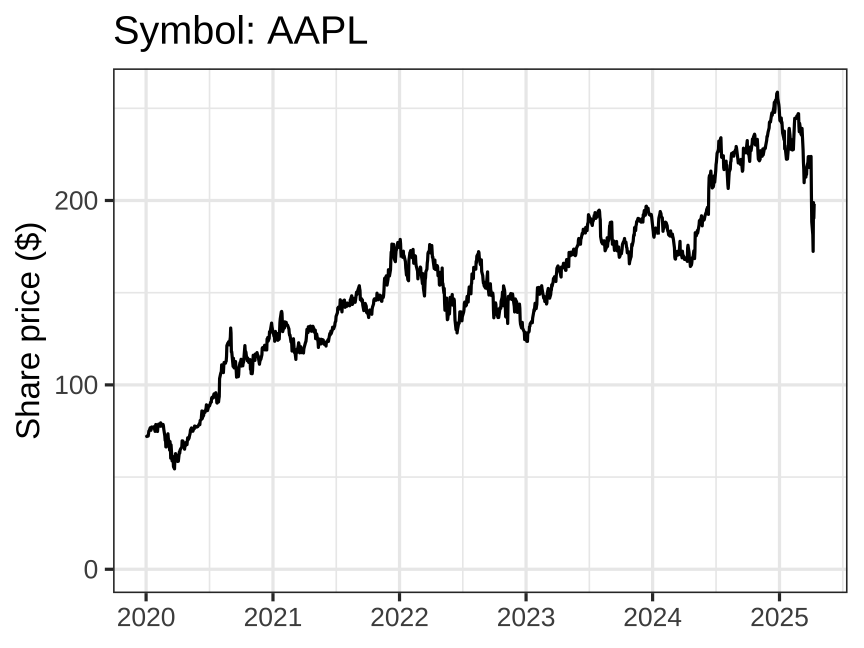 ] --- # We often run similar code multiple times .left-code[ ``` r sp500_prices |> * filter(symbol == "AMZN") |> ggplot(aes(x = date, y = adjusted)) + geom_line() + labs(x = NULL, y = "Share price ($)", * title = "Symbol: AMZN") + scale_x_date(date_breaks = "1 year", date_labels = "%Y") + scale_y_continuous(limits = c(0, NA)) + theme_bw() ``` ] .right-plot[ 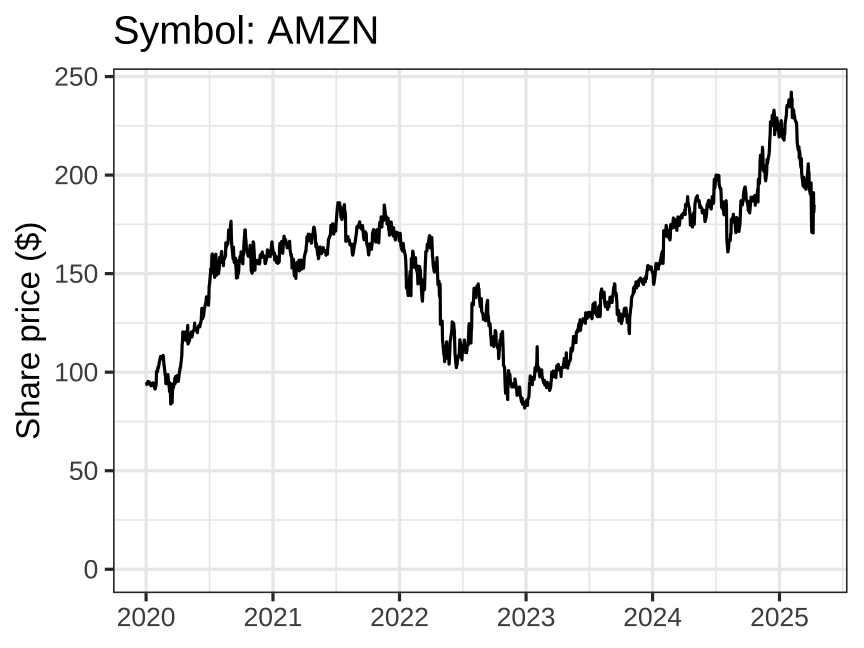 ] --- # We often run similar code multiple times .left-code[ ``` r sp500_prices |> * filter(symbol == "TSLA") |> ggplot(aes(x = date, y = adjusted)) + geom_line() + labs(x = NULL, y = "Share price ($)", * title = "Symbol: TSLA") + scale_x_date(date_breaks = "1 year", date_labels = "%Y") + scale_y_continuous(limits = c(0, NA)) + theme_bw() ``` ] .right-plot[ 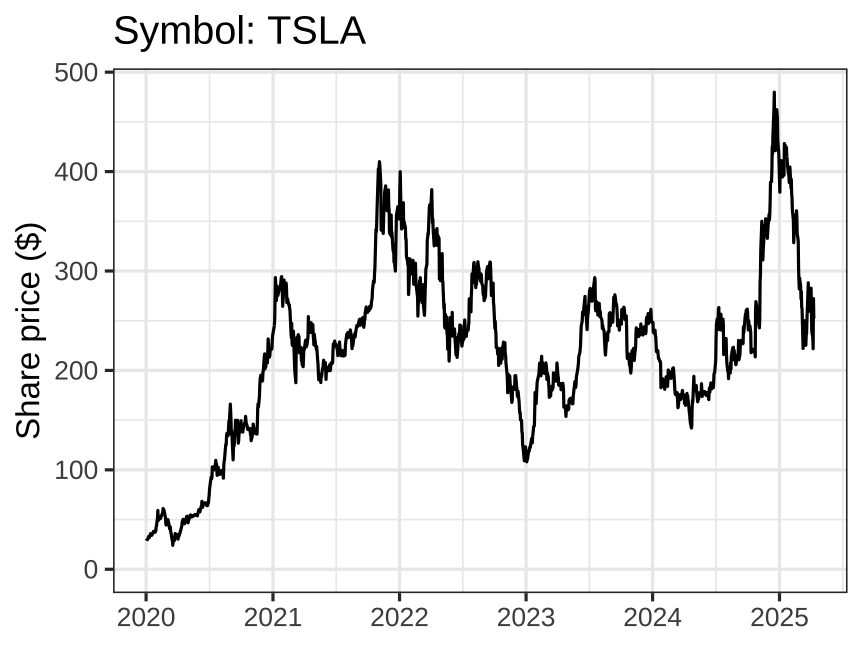 ] --- # How can we avoid duplication and mistakes? -- 1. **Avoid hard-coding specific values** 2. **Define a function** 3. **Automate calling the function** 4. Write a more general function 5. Use these concepts in a tidy pipeline We will focus on steps 1-3 due to time constraints --- # Step 1: Avoid hard-coding specific values .left-code[ ``` r sp500_prices |> filter(symbol == "AAPL") |> ggplot(aes(x = date, y = adjusted)) + geom_line() + labs(x = NULL, y = "Share price ($)", title = "Symbol: AAPL") + scale_x_date(date_breaks = "1 year", date_labels = "%Y") + scale_y_continuous(limits = c(0, NA)) + theme_bw() ``` What is "hard-coded" here? ] --- # Step 1: Avoid hard-coding specific values .left-code[ ``` r sp500_prices |> * filter(symbol == "AAPL") |> ggplot(aes(x = date, y = adjusted)) + geom_line() + labs(x = NULL, y = "Share price ($)", * title = "Symbol: AAPL") + scale_x_date(date_breaks = "1 year", date_labels = "%Y") + scale_y_continuous(limits = c(0, NA)) + theme_bw() ``` How can we avoid this hard-coding? ] --- # Step 1: Avoid hard-coding specific values .left-code[ ``` r *ticker <- "AAPL" sp500_prices |> * filter(symbol == ticker) |> ggplot(aes(x = date, y = adjusted)) + geom_line() + labs(x = NULL, y = "Share price ($)", * title = str_glue("Symbol: {ticker}")) + scale_x_date(date_breaks = "1 year", date_labels = "%Y") + scale_y_continuous(limits = c(0, NA)) + theme_bw() ``` **str_glue()** allows us to put the contents of **ticker** in the plot's title ] -- .right-plot[ 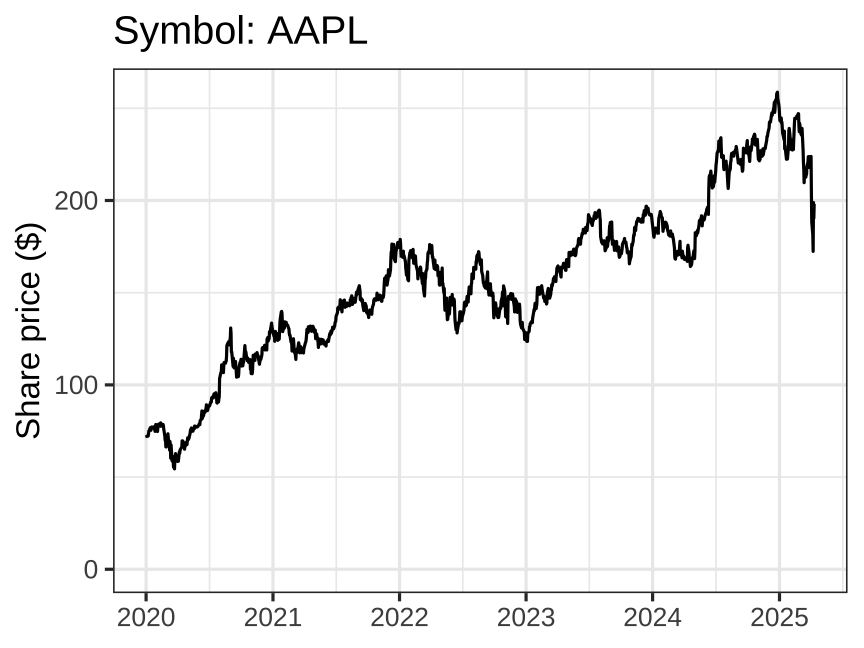 ] --- # Step 1: Avoid hard-coding specific values .left-code[ ``` r *ticker <- "AMZN" sp500_prices |> filter(symbol == ticker) |> ggplot(aes(x = date, y = adjusted)) + geom_line() + labs(x = NULL, y = "Share price ($)", title = str_glue("Symbol: {ticker}")) + scale_x_date(date_breaks = "1 year", date_labels = "%Y") + scale_y_continuous(limits = c(0, NA)) + theme_bw() ``` Now **ticker** is the only thing that changes ] .right-plot[  ] --- # Step 1: Avoid hard-coding specific values .left-code[ ``` r *ticker <- "TSLA" sp500_prices |> filter(symbol == ticker) |> ggplot(aes(x = date, y = adjusted)) + geom_line() + labs(x = NULL, y = "Share price ($)", title = str_glue("Symbol: {ticker}")) + scale_x_date(date_breaks = "1 year", date_labels = "%Y") + scale_y_continuous(limits = c(0, NA)) + theme_bw() ``` Now **ticker** is the only thing that changes ] .right-plot[  ] --- # Step 2: Define a function -- .left-code[ ``` r *make_plot <- function(ticker) { sp500_prices |> filter(symbol == ticker) |> ggplot(aes(x = date, y = adjusted)) + geom_line() + labs(x = NULL, y = "Share price ($)", title = str_glue("Symbol: {ticker}")) + scale_x_date(date_breaks = "1 year", date_labels = "%Y") + scale_y_continuous(limits = c(0, NA)) + theme_bw() *} ``` ] .pull-right[ Three key steps: 1. Pick a **name** 2. List **arguments** inside `function()` 3. Put code in the **body** of the function, delimited by `{...}` Easiest to write the body on a test case, *then* convert it into a function ] --- # Step 2: Define a function .left-code[ ``` r make_plot <- function(ticker) { sp500_prices |> filter(symbol == ticker) |> ggplot(aes(x = date, y = adjusted)) + geom_line() + labs(x = NULL, y = "Share price ($)", title = str_glue("Symbol: {ticker}")) + scale_x_date(date_breaks = "1 year", date_labels = "%Y") + scale_y_continuous(limits = c(0, NA)) + theme_bw() } *make_plot("AAPL") ``` ] .right-plot[  ] --- # Step 2: Define a function .pull-left[ ``` r *make_plot("AMZN") ``` <img src="12-slides_files/figure-html/unnamed-chunk-2-1.png" width="100%" style="display: block; margin: auto;" /> ] .pull-right[ ``` r *make_plot("TSLA") ``` <img src="12-slides_files/figure-html/unnamed-chunk-3-1.png" width="100%" style="display: block; margin: auto;" /> ] --- # Rules of thumb about functions -- - You can (almost) never write too many functions -- - When you find yourself writing the same code 3+ times, put it into a function -- - A function should be no longer than 20-40 lines -- - If a function is getting too long, break it into smaller functions --- # Step 3: Automate calling the function Individual function calls are hard to scale ``` r make_plot("AAPL") make_plot("AMZN") make_plot("TSLA") ``` What if we wanted to make this plot for every company in the S&P 500? How could you automate these function calls? -- **1. Imperative programming (for loops)** **2. Functional programming (map functions)** --- # Step 3: Automate calling the function The `purrr` packages provides `map` functions that take a vector as input, apply a **function** to each element of the vector, and return the results in a new vector: ``` r map(some_vector, some_function) ``` - `map` functions are basically identical to base R's `apply` functions -- **How can we use map to make plots for AAPL, AMZN, and TSLA?** -- ``` r symbols <- c("AAPL", "AMZN", "TSLA") plots <- map(symbols, make_plot) ``` -- Here `map` takes each element of the vector `symbols` and uses it as input for our function `make_plot()` --- # Step 3: Automate calling the function `map` returns a **list**. In this example, it's a list of plots that we assigned to `plots`: .small-code[ ``` r class(plots) ``` ``` ## [1] "list" ``` ] -- .pull-left-3.small-code[ ``` r plots[[1]] ``` <img src="12-slides_files/figure-html/unnamed-chunk-8-1.png" width="100%" style="display: block; margin: auto;" /> ] -- .pull-middle-3.small-code[ ``` r plots[[2]] ``` <img src="12-slides_files/figure-html/unnamed-chunk-9-1.png" width="100%" style="display: block; margin: auto;" /> ] -- .pull-right-3.small-code[ The syntax `plots[[x]]` allows us to drill down into the list `plots` and extract whatever object is in the `x`th position (here: a ggplot) ] --- # Step 3: Automate calling the function This scales really easily! .small-code[ ``` r *all_symbols <- sp500_prices |> distinct(symbol) |> pull() # get all the symbols in the S&P 500 all_plots <- map(all_symbols, make_plot) # make a plot for each of the symbols ``` ] -- .pull-left-3[ ``` r length(all_symbols) ``` ``` ## [1] 505 ``` ``` r length(all_plots) ``` ``` ## [1] 505 ``` ] -- .pull-middle-3[ ``` r all_plots[[35]] ``` <img src="12-slides_files/figure-html/unnamed-chunk-10-1.png" width="100%" style="display: block; margin: auto;" /> ] -- .pull-right-3[ ``` r all_plots[[500]] ``` <img src="12-slides_files/figure-html/unnamed-chunk-11-1.png" width="100%" style="display: block; margin: auto;" /> ] --- # Step 3: Automate calling the function We can also extract results using logical expressions: ``` r all_plots[all_symbols=="FRCB"] ``` <img src="12-slides_files/figure-html/failed-bank-output-1.png" width="45%" style="display: block; margin: auto;" /> --- # The map functions The `purrr` package provides a family of `map` functions that return different types of output: - `map()` makes a list - `map_lgl()` makes a logical vector - `map_int()` makes an integer vector - `map_dbl()` makes a double vector - `map_chr()` makes a character vector --- # What about `for` loops? For loops work too! ``` r symbols <- c("AAPL", "AMZN", "TSLA") plots <- vector("list", length(symbols)) # 1. allocate space for output for (i in seq_along(symbols)) { # 2. specify the sequence to loop over plots[[i]] <- make_plot(symbols[i]) # 3. specify what to do in each iteration } ``` -- But functional programming is more concise: ``` r symbols <- c("AAPL", "AMZN", "TSLA") plots <- map(symbols, make_plot) ``` --- # Why not use `for` loops? -- - They often require us to think about data logistics (indexing) -- - They encourage iterative thinking over conceptual thinking -- - Typically require more code, which often means more errors -- - Can be harder to parallelize or otherwise optimize -- **But there is nothing wrong with using them!** We can practice using `for` loops during the example if time permits --- class: inverse, center, middle name: example # example-12 --- class: inverse, center, middle name: conditional-execution # Conditional execution --- class: inverse, center, middle name: multiple-arguments # Functions with multiple arguments --- class: inverse, center, middle name: homework # homework-12